Understanding Lead Status
Understanding Lead Status
When running a campaign, keeping track of where each lead stands is important. Lead status helps you quickly identify a lead's current position in the campaign, understand what actions they have taken, and determine your next step.
In this article:
Where can I see a lead's status?
What are the different types of lead statuses?
Has errors
Where Can I See a Lead's Status?
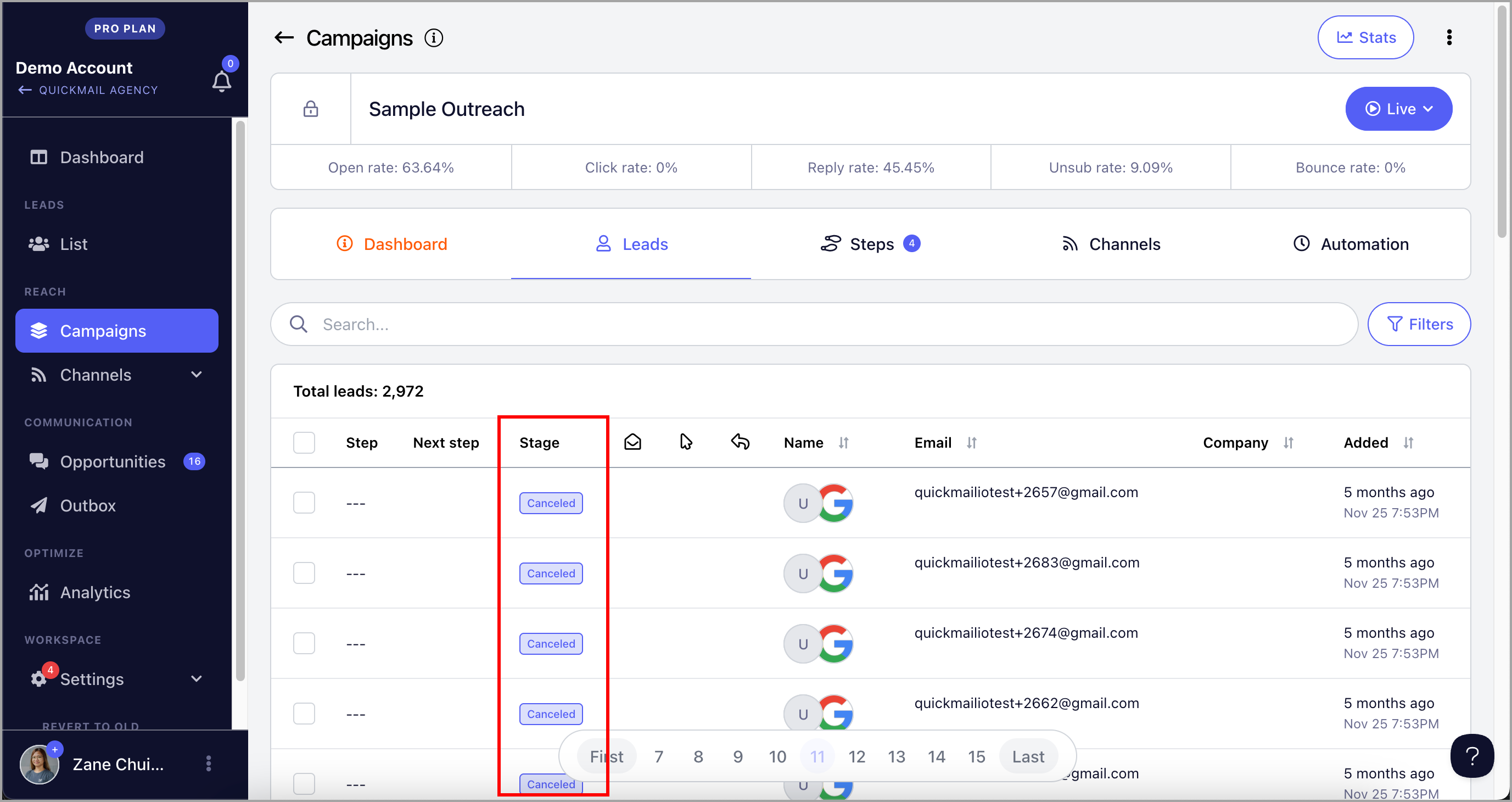
Go to a specific campaign → Leads page → see the Stage column.
What Are the Different Types of Lead Statuses?
Not Started
When leads are added to a campaign, their status is set to Not Started by default. No emails will be sent until their status changes. This is a holding stage that gives you time to review or adjust leads before the campaign begins.
Starting
The system processes leads starting a campaign every 1–15 minutes. Once a lead is set to start, it may take a few minutes for the status to change to Starting before moving to Running.
Running
A lead in Running status is actively going through the campaign. Emails are being sent to them, but they have not yet completed the sequence or replied.
Out of Office
If an automated out-of-office reply is received, the lead's status changes to Out of Office. By default, their journey is paused for 14 days and will automatically resume afterward.
Replied
When a lead replies, their status changes to Replied and further emails stop being sent to them.
Note: You can view and respond to their reply from the Opportunities page.
Unsubscribed
If a lead clicks the unsubscribe link in your emails or requests to be removed via AI reply categorization, their status changes to Unsubscribed. When this happens:
Emails to that lead stop immediately.
The lead is added to your Do Not Contact list.
They cannot be added to any future campaigns.
Bounced
If an email cannot be delivered — usually due to an invalid email address — the lead's status changes to Bounced.
Canceled
A lead's status is set to Canceled when it is manually canceled or automatically canceled based on settings such as sub-campaign rules. Canceled leads will no longer receive emails from the campaign.
Completed
When a lead completes all steps in the campaign without replying, their status changes to Completed.
Note: If you add a new step to a campaign that already has leads marked as Completed, those leads will not automatically proceed to the new step. To include them, you will need to manually resume them.
Has Errors
There are different reasons why a lead may run into an error. To see the specific error, hover over the error status icon.
Here are some common errors and how to troubleshoot them:
1. "This email will bounce."
Leads marked as invalid will cause bounces, so emails are stopped for those leads.
What to do: Ignore them or delete them from the campaign.
2. "No variations found."
This can happen if a step is paused or if the step has conditions that the lead does not match.
What to do: Check that the step is active. If the issue is related to conditions, review your conditions to make sure they are set up correctly. If everything looks correct, these leads can be ignored — it means the campaign is filtering them out based on your conditions.
3. "System Exception: 404 Not Found"
This is a temporary issue coming from the email service provider.
What to do: Try resuming the leads. Once the issue on the provider's side is resolved, the error should clear.
4. "Can't send emails, no more reword credits to use."
This error appears when Reword with AI is enabled and credits have run out. You have 1,000 credits by default and can purchase more for $10 per 10,000 credits.
Alternatively, you can turn off Reword with AI and manually resume the leads that ran into this error.
5. "Message can't be sent. You are not connected to this lead."
LinkedIn does not allow sending messages to leads you are not yet connected with.
What to do: These leads cannot be resumed until they accept the connection request. To prevent this error in future campaigns, set your LinkedIn step to wait until the connection request is accepted.
Note that leads cannot skip a step — if your campaign has email steps after the LinkedIn step, they will not be sent until the connection request is accepted.