Setting up API V2
Setting up API V2
Note: QuickMail's API is not available for accounts on Starter Plan.
Here's the complete API documentation to use: https://api.quickmail.com/help
These are mostly just JSON samples for API calls.
For convenience, we have a web app that you can use to test your integrations with your live data in QuickMail. Here's where you can access it: https://api.quickmail.com/v2/graphiql
API rate limit is 10 requests per 10 seconds.
In this article:
- Creating an API Key
- API Authorization
- API Documentation
- API Endpoint
- JSON samples for API calls:
- Getting Agency information including name, ID, and URL
- Getting workspace IDs, names, and URLs
- Getting campaign IDs, names, and URLs
- Getting campaign stats
- Getting email account IDs
- Creating campaigns
- Cloning a campaign
- Renaming a campaign
- Creating email steps
- Creating email variation
- Creating a Wait step
- Setting up Campaign Email Verification
- Updating send times
- Assigning/unassigning email accounts to/from campaigns
- Changing email account sender name
- Setting email account daily sending limit
- Setting email account recovery period
- Setting email account sending groups (Deliverability AI)
- Getting sender email account info
- Creating custom properties
- Setting custom properties
- Creating Tags
- Setting Tags
- Getting the number of available, active, and completed leads in a campaign
- Getting the number of leads that ran into an error
- Getting leads
- Deleting Leads
- Setting Leads as Do Not Contact (Add to Exclude list)
- Canceling Journeys (Canceling Leads in a Campaign)
- Removing Journeys (Removing Leads from a Campaign)
- Listing Opportunities
- Getting an Opportunity
- Replying to an Opportunity
- Moving to the next page
- Filtering: Search leads by tags
- Filtering: Search leads by campaign name/IDs
- Filtering: Exclude/Include workspace name/IDs
- Ruby samples
- Creating a lead
- Retrieving a lead's information
Creating an API key
To create an API key, please refer to this guide: Creating an API key in QuickMail
Note: QuickMail now has an MCP server! You can connect it to AI assistants like Claude and ChatGPT. Learn more here
Authorization
To get started, paste this on the headers:
{
  "Authorization": ""
}
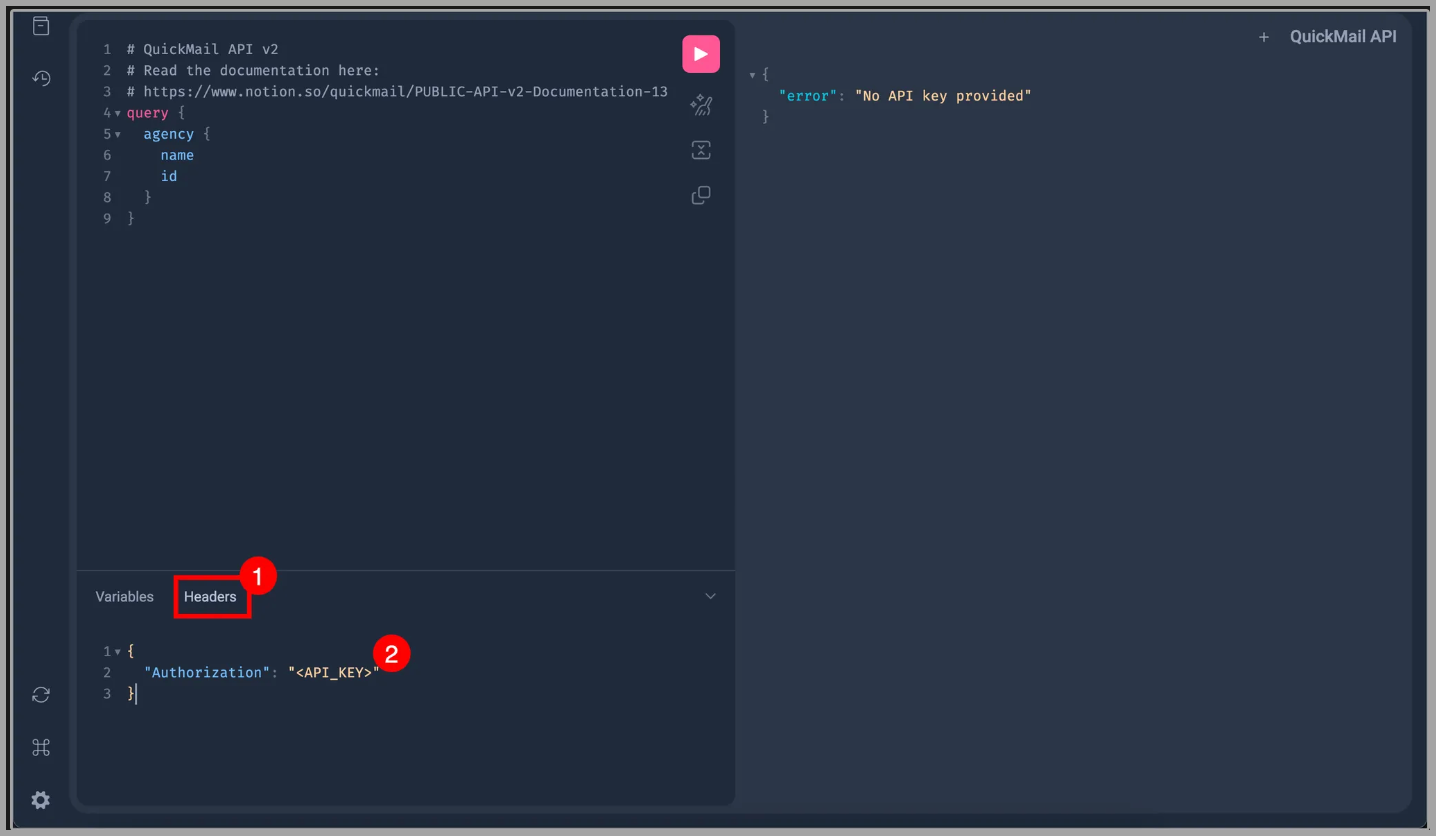
Then, generate your API in QuickMail and replace the word
Here's an article to help you generate an API key.
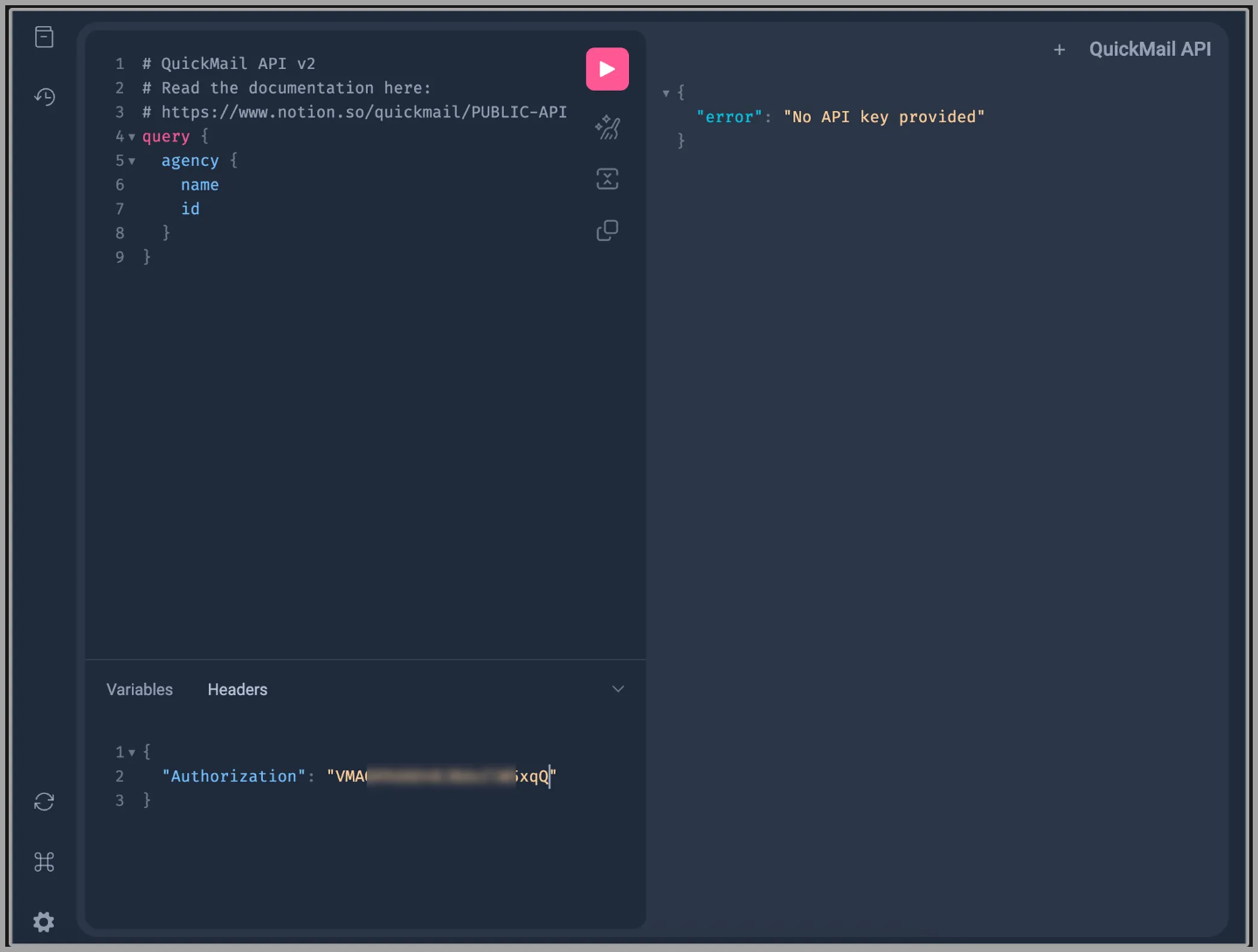
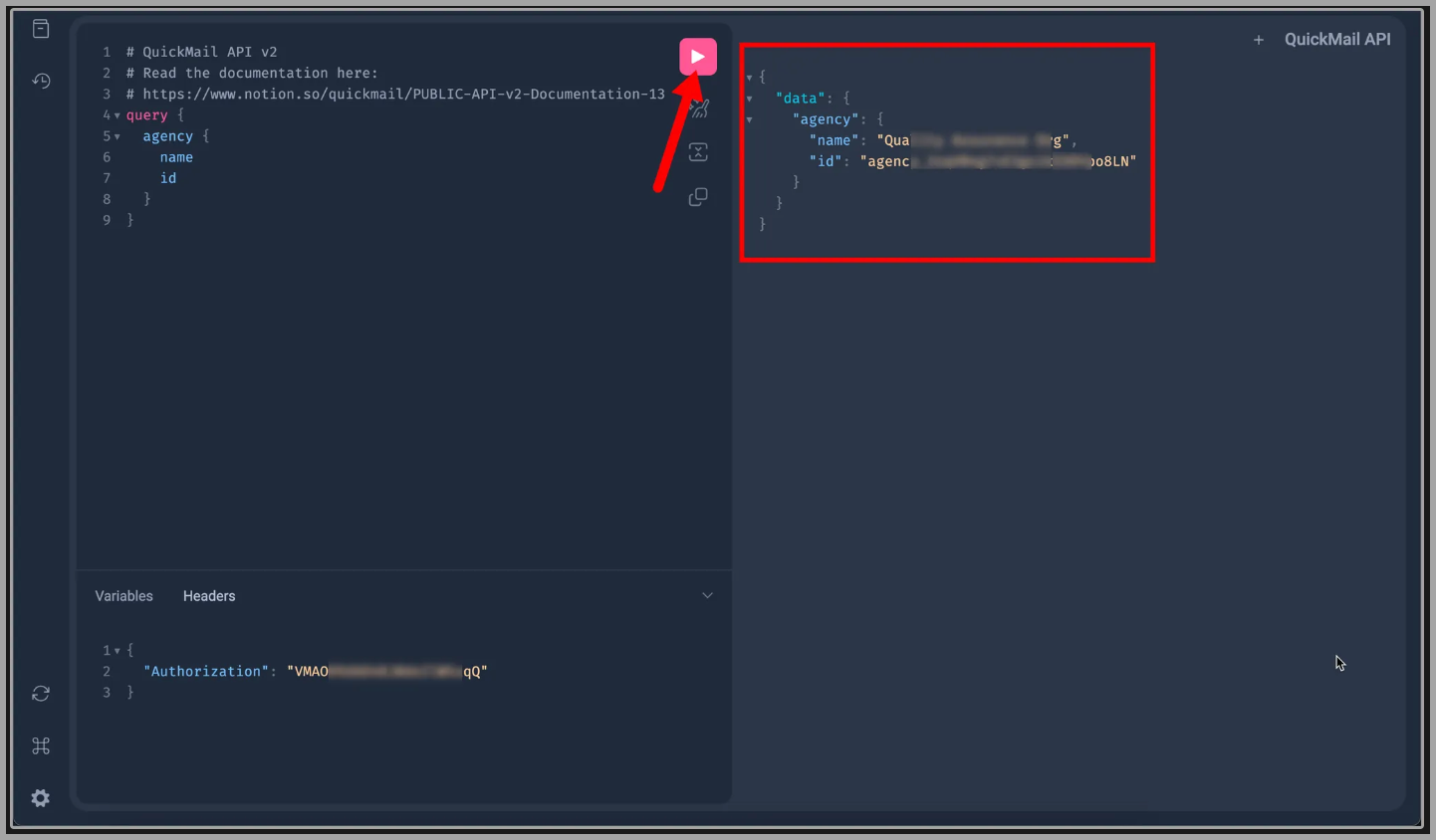
Next, click the play button.
If the API key is valid, it should show the name of your agency, as well as the ID. Like this:
[!WARNING]
If an error appears, please double-check that the API key you pasted is correct, that it has access to the workspaces, and that it still exists on the agency dashboard, since other team members can delete it.
Once you've corrected the API key or added a new one, just replace the old key in the headers and press the play button again.
Documentation
Here's the full documentation: https://api.quickmail.com/help
Endpoint
To use the API directly, send POST requests directly to: https://api.quickmail.com/v2/graphql
This URL is different from the GraphiQL page URL: https://api.quickmail.com/v2/graphiql
JSON samples
Getting Agency information including name, ID, and URL
{
  agency {
    id
    name
    appUrl
  }
}
Getting workspaces IDs, names, and URLs
{
  agency {
    id
    name
    appUrl
    workspaces {
      nodes {
        id
        name
        appUrl
      }
    }
  }
}
Getting campaign IDs, names, and URLs
{
  agency {
    id
    name
    appUrl
    campaigns {
      nodes {
        id
        name
        appUrl
      }
    }
  }
}
Getting campaign stats based on a specific campaign
The following stats are available for each campaign:
- Total emails sent
- Delivered
- Delivered with open tracking
- Delivered with click tracking
- Bounces
- Opens
- Clicks
- Unsubscribes
- Replies
- Positive replies
- Negative replies
- LinkedIn profile visits
- LinkedIn connection requests sent
- LinkedIn connection requests accepted
{
  agency {
    id
    name
    appUrl
    campaign(id: "add-the-campaign-id-here") {
      id
      name
      appUrl
      stats {
        connectionRequests
        profileVisits
        newConnections
        delivered
        deliveredTrackingOpens
        deliveredTrackingClicks
        bounces
        clicks
        unsubscribes
        opens
        replies
        repliesPositive
        repliesNegative
        delivered
        total
      }
    }
  }
}
Getting email account IDs
This only pulls up the list of inboxes/email sender in the account. It doesn't pull up the stats related to the inboxes such as open, clicks, replies, sent emails, etc.
{
  agency {
    id
    name
    appUrl
    workspaces {
      nodes {
        id
        name
        appUrl
      }
    }
    emailAccounts {
      nodes {
        id
      }
    }
  }
}
Creating campaigns
mutation createCampaign {
  createCampaign(
    input: {
      workspaceId: "add-workspace-id-here",
      name: "Campaign 2",
    }
  ) {
    campaign {
      id
      name
    }
  }
}
Cloning a campaign
mutation {
  duplicateCampaign(input: { campaignId: "campaign_xxx", name: "New campaign name" }) {
    campaign {
      id
      name
    }
  }
}
Renaming a campaign
mutation {
  renameCampaign(input: { campaignId: "campaign_xxx", name: "New name" }) {
    campaign {
      id
      name
    }
  }
}
Creating email steps
mutation createEmailStep {
  createEmailStep(
    input: {
      campaignId: "add-campaign-id-here",
      subject: "insert subject here",
      body: "insert body here",
      continueThread: Boolean,
      openTracking: Boolean,
      clickTracking: Boolean,
      draft: Boolean,
      plainText: Boolean,
      cced: "insert cc email here",
      bcced: "bcc here"
      preview: "The preview text snippet shown before opening the email in the user mail client.",
      paused: Boolean,
      clientMutationId: "A unique identifier for the client performing the mutation."
    }
  ) {
    step {
      id
    }
  }
}
Creating email variation
mutation addEmailVariation {
  addEmailVariation(
    input: {
      stepId: "campaign step ID here",
      subject: "insert subject here",
      body: "insert body here",
      continueThread: Boolean,
      openTracking: Boolean,
      clickTracking: Boolean,
      draft: Boolean,
      plainText: Boolean,
      cced: "insert cc email here",
      bcced: "bcc here"
      preview: "The preview text snippet shown before opening the email in the user mail client.",
      paused: Boolean,
      clientMutationId: "A unique identifier for the client performing the mutation."
    }
  ) {
    variation {
      id
    }
  }
}
Creating Wait step
mutation createWaitStep {
  createWaitStep(
    input: {
      campaignId: "insert campaign ID here",
      unit: "days",
      value: 3
    }
  ) {
    step {
      id
    }
  }
}
Setting up Campaign Email Verification
mutation {
  setCampaignEmailVerification(
    input: { campaignId: "campaign_xxx", enabled: true, provider: "quickmail" }
  ) {
    campaign {
      id
      name
      emailVerificationEnabled
      emailVerificationProvider
    }
  }
}
Updating send times
mutation updateCampaignAutomation {
  updateCampaignAutomation(
    input: {
      campaignId: "insert campaign ID here",
      timeZone: "UTC",
      businessDays: {
        sunday: boolean,
        monday: boolean,
        tuesday: boolean,
        wednesday: boolean,
        thursday: boolean,
        friday: boolean,
        saturday: boolean
      },
      timeRanges: [
        {
          day: monday, startTime: "00:00", endTime: "00:00",
          day: tuesday, startTime: "00:00", endTime: "00:00"
        }
      ]
    }
  ) {
    campaign {
      id
    }
  }
}
Assigning/unassigning email accounts to/from campaigns
mutation setCampaignEmailAccounts {
  setCampaignEmailAccounts(
    input: {
      campaignId: "insert campaign ID here",
      emailAccountIds: ["email ID", "email ID"],
      assign: boolean
    }
  ) {
    emailAccounts {
      id
    }
    campaign {
      id
    }
  }
}
Changing email account sender name
mutation {
  renameEmailAccount(input: {
    emailAccountId: "email_xxx"
    name: "Jane Smith"
  }) {
    emailAccount { id name }
  }
}
Setting email account daily sending limit
mutation {
  setEmailAccountDailySendingLimit(input: {
    emailAccountId: "email_xxx"
    dailySendingLimit: 20
  }) {
    emailAccount { id dailySendingLimit }
  }
}
Setting email account recovery period
mutation {
  setEmailAccountRecoveryPeriod(input: {
    emailAccountId: "email_xxx"
    recoveryPeriodDays: 10
  }) {
    emailAccount {
      id
      recoveryPeriodDays
      effectiveRecoveryPeriodDays
    }
  }
}
Setting email account sending groups (Deliverability AI)
mutation {
  setEmailAccountsSmartSendingGroups(input: {
    emailAccountIds: ["email_xxx"]
    groups: [RED, BLUE, GREEN]
    assign: true
  }) {
    emailAccounts {
      id
      email
      smartSendingGroups {
        name
        color
      }
    }
  }
}
Getting email account info
The following email account info is available to get via the API:
- Daily sending limit
- Smart sending group (Deliverability AI)
- Recovery Period (Deliverability AI)
- Deliverability Index
- Autowarmer score
query {
  emailAccount(id: "email_xxx") {
    id
    name
    dailySendingLimit
    deliverabilityScoreThreshold
    effectiveDeliverabilityScoreThreshold
    recoveryPeriodDays
    effectiveRecoveryPeriodDays

    deliverabilityScore
    autoWarmerScore

    smartSendingGroups {
        name
        color
    }
  }
}
Creating custom properties
mutation createCustomProperty {
  createCustomProperty(
    input: {
      workspaceId: "workspace_5Mk2rvQpagb0aTLVXGDKRN4E",
      name: "name of property",
      value: "default value"
    }
  ) {
    customProperty {
      id
      name
    }
  }
}
Setting Custom Properties
mutation setCustomProperty {
  setCustomProperty(
    input: {
      workspaceId: "workspace_xxxx",
      customPropertyId: "custom_property_xxx",
      leadIds: [
        "lead_xxx",
        "lead_xxx"
      ],
      value: "set via v2 API"
    }
  ) {
    leads {
      id
      customProperties {
        nodes {
          id
          name
          value
        }
      }
    }
  }
}
Creating Tags
mutation createTag {
  createTag(input: { workspaceId: "workspace_xxxxx", name: "newtag" }) {
    tag {
      id
      name
    }
  }
}
Setting Tags
mutation setTags {
  setTags(
    input: {
      workspaceId: "workspace_xxx",
      leadIds: [
        "lead_xxx",
        "lead_xxx"
      ]
      tagIds: [
        "tag_xxx",
        "tag_xxx",
      ],
      assign: true # or false to untag
    }
  ) {
    leads {
      id
      tags {
        nodes {
          id
          name
        }
      }
    }
  }
}
Getting number of available, active, and completed leads in a campaign
{
  campaigns {
    nodes {
      id
      name
      leadStatus {
        total
        active
        available
        completed
      }
    }
  }
}
Getting number of leads that ran into an error
{
  campaigns {
    nodes {
      id
      name
      leadStatus {
        failed
      }
    }
  }
}
Getting leads
query getLeads {
  leads {
    edges {
      node {
        id
        email
        firstName
        lastName
        fullName
        title
        role
        phone
        linkedinId
        language
        score
        appUrl
      }
    }
  }
}
Deleting leads
mutation {
  deleteLeads(input: { workspaceId: "workspace_a3ZyeOmKbzDXAiLzMXDY5APE", leadIds: ["lead_r6zQLkOd0pnQiGVERvwaj14g", "lead_KQdYzj8W7OnJiY90AbaBeL6p"], permanent: false }) {
    clientMutationId
  }
}
Setting Leads as Do Not Contact / Adding to Exclude List
mutation {
  setLeadsAsDoNotContact(
    input: {workspaceId: "workspace_xxx", leadIds: ["lead_xxx", "lead_yyy"], doNotContact: true}
  ) {
    leads {
      id
      email
      doNotContact
    }
  }
}
Canceling Journeys (Canceling leads in a campaign)
mutation {
  cancelLeadsFromCampaign(input: {
    campaignId: "campaign_xxx",
    leadIds: ["lead_xxx", "lead_yyy"]
  }) {
    leads {
      id
      email
    }
  }
}
Removing Journeys (Removing leads from a campaign)
mutation {
  removeLeadsFromCampaign(input: {
    campaignId: "campaign_xxx",
    leadIds: ["lead_xxx"]
  }) {
    clientMutationId
  }
}
Listing Opportunities
{
  opportunities(first: 10) {
    nodes {
      id
      subject
      preview
      state
      status
      createdAt
      updatedAt
      appUrl
      lead {
        id
        email
        fullName
      }
      campaign {
        id
        name
      }
    }
    pageInfo {
      hasNextPage
      endCursor
    }
    totalCount
  }
}
Getting an Opportunity
{
  opportunity(id: "opportunity_Nr516X8OwN7Ef9G5DVl7v2aM") {
    id
    subject
    state
    status
    aiSummary
    appUrl
    lead {
      id
      email
      fullName
    }
    parts(first: 10) {
      nodes {
        id
        type
        from
        to
        author
        createdAt
        content
      }
      pageInfo {
        hasNextPage
        endCursor
      }
    }
  }
}
Replying to an Opportunity
mutation {
  replyToOpportunity(
    input: {
      opportunityId: "opportunity_Nr516X8OwN7Ef9G5DVl7v2aM"
      html: "<div>Hi! Thanks for getting back to me.</div><div><br></div><div>Talk soon!</div>"
    }
  ) {
    sentPart {
      id
      type
      from
      to
      createdAt
      content
    }
  }
}
Moving to the next page
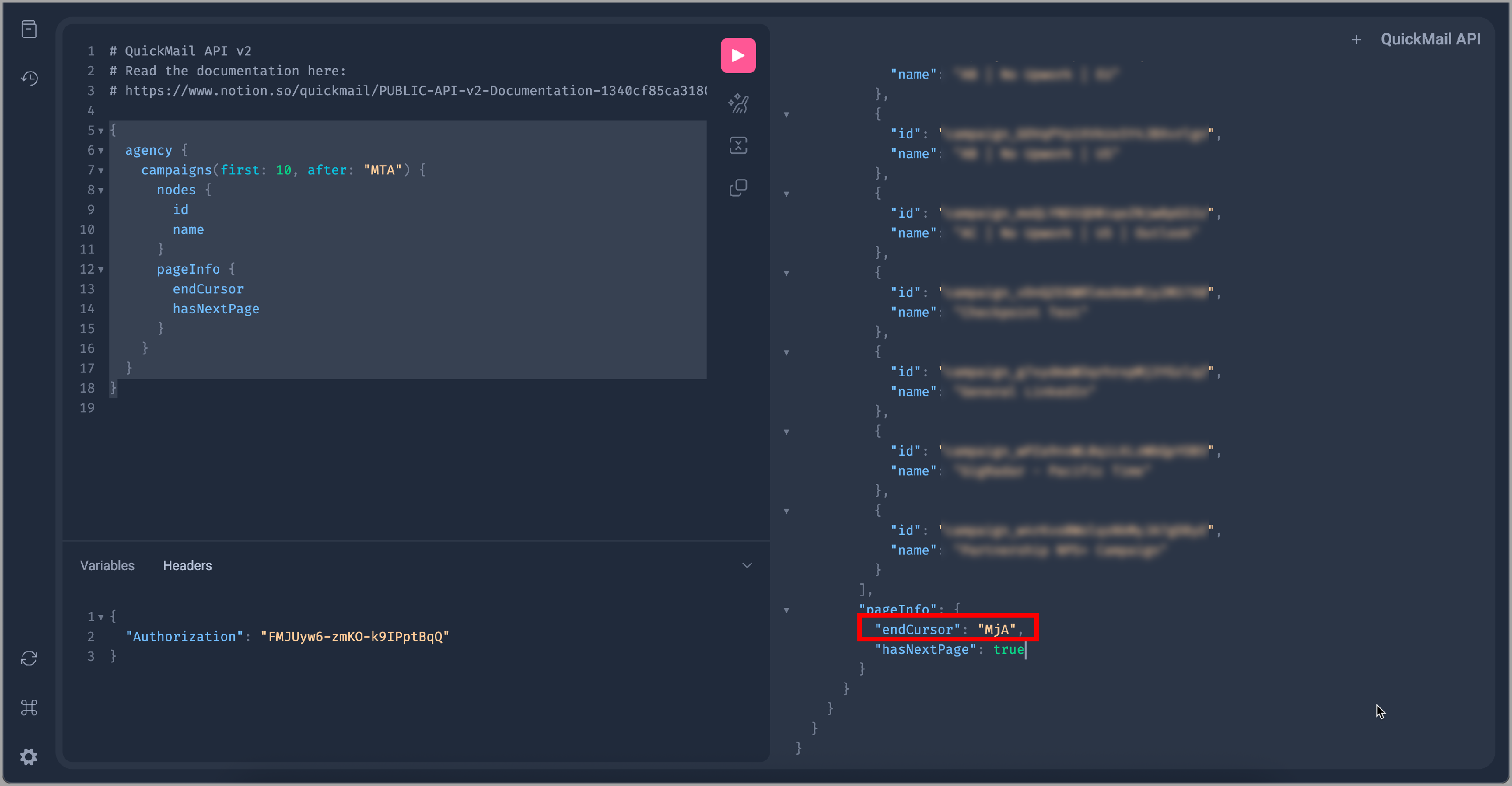
We only show the 1st 10 items on the 1st page.
So you need to use this JSON to move to the next page.
{
  agency {
    campaigns(first: 10, after: "MTA") {
      nodes {
        id
        name
      }
      pageInfo {
        endCursor
        hasNextPage
      }
    }
  }
}
To move to the next pages, use the endCursor code and insert it into campaigns(first: 10, after: "endCursor")
Filtering: Search leads by tags
query {
  leads(text: "tags:xxxx"){
    nodes{
      id
      email
    }
  }
}
Filtering: Search leads by campaign ID
{
  leads(includeCampaignPrefixIds: ["campaign_xxx"], first: 20) {
    nodes {
      id
      email
      firstName
      lastName
    }
  }
}
Filtering: Search leads by campaign name
{
  leads(includeCampaignNames: ["search term"], first: 20) {
    nodes {
      id
      email
    }
  }
}
Filtering: Exclude Workspace IDs
query {
  campaigns(
    excludeWorkspaceIds: [
      "workspace_ID1",
      "workspace_ID2",
      "workspace_ID3"
    ]
  ) {
    nodes {
      name
      appUrl
      id
    }
  }
}
Filtering: Include Workspace IDs
query {
  campaigns(
    includeWorkspaceIds: [
      "workspace_ID1",
      "workspace_ID2",
      "workspace_ID3"
    ]
  ) {
    nodes {
      name
      appUrl
      id
    }
  }
}
Ruby Samples
Creating a lead
quickmail_key = 'your api key'
workspace_id = 'workspace_yourworkspace_id'

email = 'john@ibm.com'

mutation = <<~TEMPLATE
  mutation CreateLeads($input: CreateLeadsInput!) {
    createLeads(input: $input) {
      leads {
        id
        email
      }
    }
  }
TEMPLATE

variables = { input: { workspaceId: workspace_id, leads: [{firstName: 'John', email: 'john@ibm.com'}] } }

query = { query: mutation, variables: }

options = {
  url: 'https://api.quickmail.com/api/v2/graphql',
  headers: {
    authorization: "#{quickmail_key}",
    accept: 'application/json',
    content_type: 'application/json'
  },
  method: :post,
  payload: query.to_json
}

response = RestClient::Request.execute(options)

body = JSON.parse(response.body)

errors = body.dig('errors')
Retrieving a lead's information
quickmail_key = 'your api key'

workspace_id = 'workspace_yourworkspace_id'

email = 'john@ibm.com'

payload = <<~TEMPLATE
  {
    workspace(id: "#{workspace_id}") {
      id
      name
      leads(text: "#{email}") {
        nodes {
          id
          email
        }
      }
    }
  }
TEMPLATE

query = { query: payload }

options = {
  url: 'https://api.quickmail.com/api/v2/graphql',
  headers: {
    authorization: "#{quickmail_key}",
    accept: 'application/json',
    content_type: 'application/json'
  },
  method: :post,
  payload: query.to_json
}

response = RestClient::Request.execute(options)

body = JSON.parse(response.body)

errors = body.dig('errors')